The Elastic Scene Generator
Beside the Vehicle prefab, the ElasticSceneGenerator (ESG) component is the second foundational pillar of any elastic virtual experience. It acts as the centralized engine of the generation pipeline, querying geographic map assets on the go, loading data from your Elastic Graph, procedurally sculpting Unity terrains, and instantiating game objects around your vehicle in real-time.
---
config:
  flowchart:
    subGraphTitleMargin:
      bottom: 30
---
graph TD
    %% Inputs
    A["Raw Geographic Data <br> (Map Service / OSM / GPS)"] -->|Streams to| ESG["Elastic Scene Generator <br> (ESG Engine)"]
    B["Elastic Graph <br> (Scene Definition / Algorithms)"] -->|Configured inside| ESG
    C["Vehicle State <br> (Player Position / ShiftOffset)"] -->|Anchors| ESG

    %% Internal Processing
    subgraph ESG_Process ["Elastic Scene Generator Internal Loop"]
        ESG -->|Sculpts & Textures| ESG_Terr["Unity Terrain Cells"]
        ESG -->|Evaluates Spawners| ESG_Spaw["Spawning System"]
    end

    %% Outputs
    ESG_Terr -->|Compiles| D["Deformed & Textured Landscape"]
    ESG_Spaw -->|Instantiates| E["Procedurally Spawned Props <br> (Trees, Houses, Obstacles)"]

    %% Styling
    style A fill:#4CAF50,stroke-width:0px,color:#fff
    style B fill:#2196F3,stroke-width:0px,color:#fff
    style C fill:#FF9800,stroke-width:0px,color:#fff
    style ESG fill:#9C27B0,stroke-width:0px,color:#fff
    style D fill:#3f51b5,stroke-width:0px,color:#fff
    style E fill:#00bcd4,stroke-width:0px,color:#fff
    style ESG_Process fill:#E5E5E5,stroke-width:0px
    style ESG_Terr fill:#CCCCCC,stroke-width:0px
    style ESG_Spaw fill:#CCCCCC,stroke-width:0px
The procedurally generated terrain is constructed natively using Unity's official Terrain system.
Tip
You can quickly instantiate a pre-configured Elastic Scene Generator GameObject in your scene hierarchy from the right-click context menu: Create > holoride > Elastic Scene Generator.
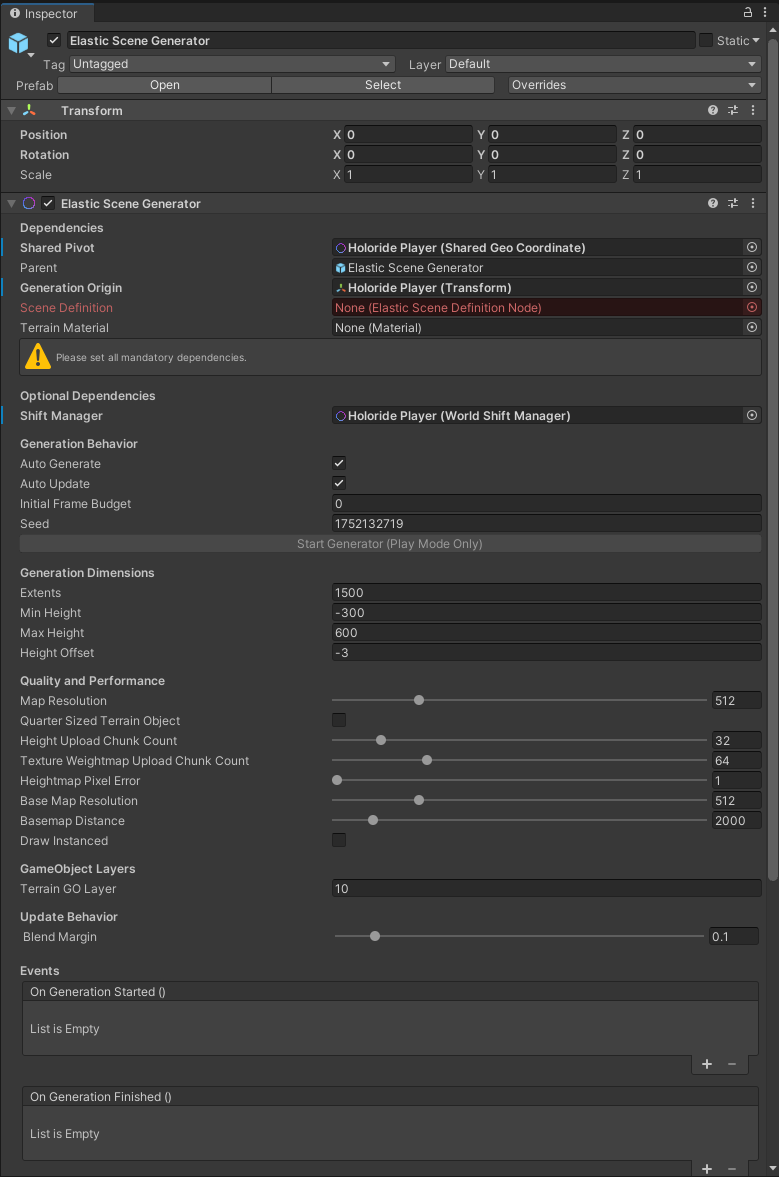
Component Configuration Categories
The ElasticSceneGenerator component contains several critical settings panels:
1. Core Dependencies
- Shared Pivot: The coordinate origin over time. This is typically assigned to the Player / Vehicle prefab.
- Parent: The container transform under which all procedurally generated terrain cells and spawned props will be childed. Typically assigned to the ESG GameObject itself.
- Generation Origin: The center coordinate point from which content generation is calculated. Usually assigned to the Player / Vehicle prefab to follow the user's movements.
- Scene Definition: The reference field where you drag your graph's Elastic Scene Definition sub-asset to drive the algorithmic generation.
- Terrain Material: The custom Material used to render and shade the compiled procedural terrain.
2. Generation Behavior
Includes toggles to automate when terrains are generated or updated (such as Auto Generate on startup). Both options default to true for a seamless runtime experience.
3. Terrain Dimensions
Controls the size, resolution, and height offsets of individual terrain cells.
- Note: The default terrain/spawning height offset is
-3. This creates a comfortable visual vertical cushion below the vehicle (world centery = 0) to prevent clipping issues.
4. Quality and Performance
Features specialized settings (such as pixel error tolerances and basemap resolutions) mapping directly to Unity's native terrain pipeline. To learn how to balance visual quality and frame rates, refer to our Quality & Performance section.
5. GameObject Layers
Specifies the target Unity Physics Layer that procedurally spawned GameObjects will be assigned to (helping manage collision filtering and raycast targeting).
6. Update Behavior
Defines how adjacent procedural terrain cells blend and stitch together seamlessly at runtime as the vehicle crosses boundaries.
7. Unity Events
Exposes high-level runtime hooks (such as OnGenerationStarted and OnGenerationFinished) that you can bind to custom scripts to trigger custom gameplay, UI states, or audio transitions during pipeline updates.